Classic System
Simple grid tiling in Flowker—presets, saved layouts, and when to use Classic instead of Flow System.
Getting started
Classic System is the fastest table management tool on the market - available free, forever. First you shape the grid on the Layout page (Classic tab), then you choose your presets during your session from the Classic Widget.
Layout & grid
Cell ≈ 612×382 px
- 4 tables — primaryActive
- 6 tables — grind
- 8 tables — late reg
Layout (Classic tab)
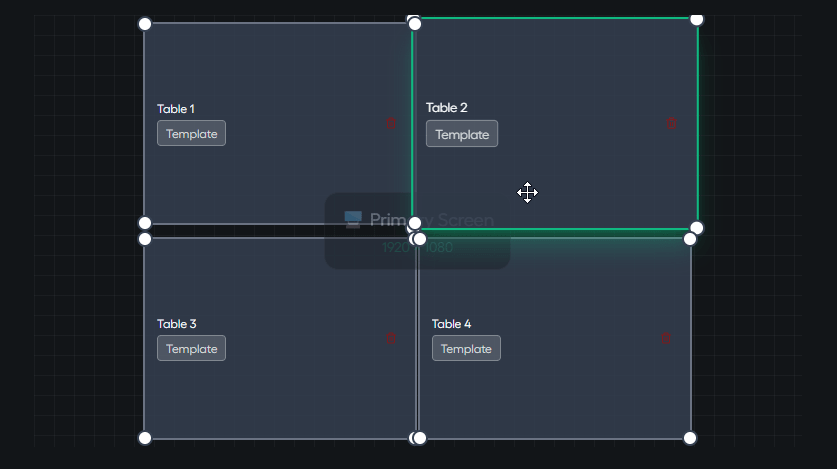
The top preview the Layout Creation inside Classic System: table count, Activate, Auto grid or customize Grid yourself then Save to create your Presets.
Classic Widget
The widget preview is the floating window: Classic Widget. Active marks the layout applied to your tables; pick another row to swap faster without returning to Flowker app during gameplay.
Manual layout on the preview
On the Layout page (Classic tab), you can run Auto grid for automatic table placement — or personalize the layout directly on the preview: drag table slots, resize them on the grid, and save a preset for your next session.
When to prefer Classic vs Flow
- Classic — You want fast grid tiling and already use another tool for notes, or you like the widget staying small until you expand it.
- Flow System — You want notes, borders, RNG, and tiling in the same always-on taskbar.
GG/Coin min Size
Toggle this ON if you're playing on GG or CoinPoker - It ensure proper table ratio according to GG Poker and Coin Poker minimum table size.